
To figure out which creative truly drives the best performance, you need to run a controlled scientific test.
Many advertisers make the mistake of just throwing five different ads into a single ad set and letting them run. The problem? Meta’s algorithm will quickly favor whichever ad gets early engagement and dump all the budget into it—meaning the other four ads never actually get a fair chance.
To find the actual best creative, you must use Meta's built-in A/B Test tool (formerly known as split testing). This forces the system to split your audience into equal, non-overlapping segments, ensuring both ads get a fair fight in the auction without competing against each other.
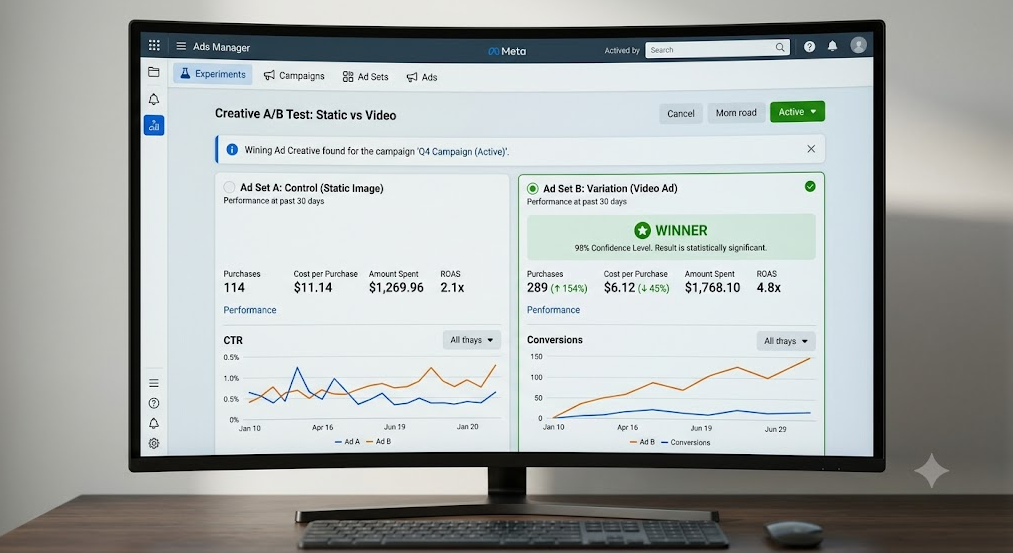
Step-by-Step A/B Test Setup
- Create Your Control Ad: Start by building your campaign and ad set as usual. Create your first ad—this is your “Control.” You can publish it or leave it saved as a draft.
- Launch the A/B Test Tool: From the main Ads Manager dashboard, check the box next to your newly created ad or campaign. Then, click the A/B Test button in the top toolbar (it looks like a little beaker icon).
- Select “Creative” as the Variable: Meta will ask what you want to test (Creative, Audience, Placement, or Custom). Choose Creative. This tells the system to perfectly duplicate your targeting and budget while letting you change the ad itself.
- Modify ONE Element in the Variation: In the setup window, Meta will generate a “Version B” of your ad. Change only one thing. If you want to test a video against a static image, swap the media but keep the exact same headline and primary text.
- Set Budget, Schedule, and Winning Metric: Choose how long the test will run (Meta recommends 7 days to account for weekday/weekend behavioral shifts). Select your key metric for determining the winner—usually “Cost per Result” or “Cost per Purchase,” not just click-through rate. Review and publish.
The Golden Rules of Creative Testing
To ensure your test actually gives you actionable data, stick to these three principles:
The “One Variable” Rule
If you change the video and the headline in Version B, you will never know which change actually drove the improvement. Test isolated variables: Thumbnail A vs. Thumbnail B, or Hook A vs. Hook B.
Don't Touch It
Once the test is live, leave it alone. Making edits to an active A/B test will reset the algorithm's learning phase and skew your results.
Mind the Confidence Level
When the test concludes, Meta will give you a “confidence percentage.” If it says there is a 90% chance Version B is the winner, you can safely scale that creative. If it's a 55% chance, the results are essentially a tie, meaning the creative difference wasn't significant enough to sway your audience.
Frequently Asked Questions (FAQ) About Meta Ads A/B Testing
Q1: How long should I run my Meta Ads A/B test before deciding a winner?
A: Meta strongly recommends running your A/B tests for at least 7 days. This timeframe allows the algorithm to exit the learning phase and accounts for behavioral fluctuations that occur on different days of the week (e.g., weekday vs. weekend traffic). Avoid the temptation to stop a test after just 2 or 3 days, even if one ad seems to be winning early on—premature results are rarely statistically significant.
Q2: What is the difference between standard A/B Testing and Dynamic Creative (DCO)?
A: A/B testing is a controlled, scientific experiment where your audience is strictly split into non-overlapping groups to test one specific variable (e.g., Video A vs. Video B). Dynamic Creative, on the other hand, is an automated machine-learning feature. You upload multiple assets (images, videos, headlines, text), and Meta automatically mixes and matches them in real-time to serve the optimal combination to each specific user. Use A/B testing when you need concrete insights on what works, and use DCO for scalable, automated performance.
Q3: How much budget do I need to get statistically significant results from an A/B test?
A: Your required budget depends entirely on your target Cost Per Action (CPA). To reach statistical significance, each ad set in your test needs enough data to stabilize—ideally generating at least 50 optimization events (like purchases or leads) during the testing window. For example, if your target CPA is
For help with Meta Ads setup, creative production, and ongoing optimisation, explore our marketing, advertising, and promotion services.